A Halloween treat for your practice

25% off your first 4 months

Starts Monday, October 26

Upcoming offer for new signups. Standard pricing resumes after four months. The offer has not started yet.

See regular plans

Psychiatric AI scribe · built by a PMHNP

The psychiatric AI scribe for the work around the visit.

Draft the note. Review the clinical details. Explore a workspace that brings billing, follow-ups, and letters into view — built for psychiatrists and PMHNPs.

Try a visit yourself

Works beside your EHR · Web app or Chrome extension · 5 free hours to test

See the October 26 billing & workspace preview
October 26 workspace preview01 / The visit
Capture the conversation
or dictate your summary

At the center

A note you review.MSE · medications · assessment & plan

The next chapter of Psynopsis

Release planned for

See the work around the visit.

Choose a workflow, then step through it. See what Psynopsis brings into view and where your team makes the decisions.

Billing calculator

Understand the details behind your code.

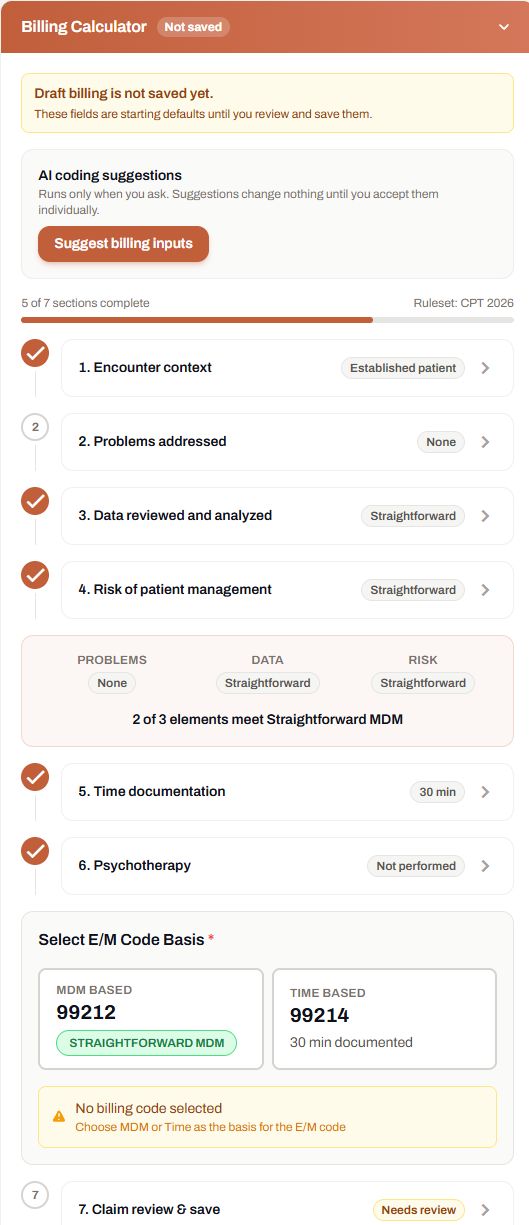
Bring the details behind psychiatric coding into view. Review encounter context, medical decision making, visit time, and psychotherapy documentation alongside the patient chart. Optional AI suggestions require your acceptance.

  • Review problems, data, and management risk
  • Choose MDM or time before saving
  • Document psychotherapy time separately
Try a guided visit
How it worksIllustration · not an app screen
Medical decision makingProblems · data · risk
E/M timeDocumented separately
Clinician selectionChoose the E/M basis
MDMorTime

Psychotherapy time stays separate.
An add-on uses an MDM-based E/M code.

Review & saveYour code selection. Your confirmation.

Step 1 of 3

See what goes into the calculation.

Review encounter context, problems addressed, data, and management risk. AI input suggestions are optional and require individual acceptance.

Clinician reviews the inputs
See the actual calculator

Inside the test workspace

The actual billing calculator

October 26 release preview. Unsaved starting values; no billing code selected.

Actual test-workspace billing calculator with an unsaved-draft notice, optional Suggest billing inputs button, and sections for encounter context, problems, data, risk, time, psychotherapy, and claim review
View full calculator screenshot ↗

An explanation of the calculator, not a coding recommendation or a guarantee of payment.

See how it fits before you commit.

Preview a fictional visit without an account, or start with 5 free test hours.

October 26 release preview. The free allowance is for synthetic or de-identified examples. BAA included on paid plans.

Medication reference

Medication information, close to the conversation.

The Medication Safety panel detects medication names in the transcript and lets you search reference cards. Review warnings, counseling information, and source links while checking the patient’s medication details.

  • Detected names from the transcript
  • Search by generic or brand name
  • Reference information for clinician review
Start free

Workflow illustration · not an app screenshot

Medication reference
Information to review during the encounter
Medication Safety panel
Transcript Detected medication names
Search Generic or brand name
Reference cards Warnings and counseling information
Sources Links to reference labels
Clinical review Verify doses and patient-specific risks
AI draft — clinician review required before signing.

Mental status exam

Review the baseline. Document what is different.

The MSE uses a chart-by-exception workflow. Review the current baseline, record meaningful exceptions or limitations, and complete the separate suicide and violence risk selections before saving.

  • Review each examination domain
  • Record exceptions and assessment limitations
  • Complete explicit safety selections
Start free

Workflow illustration · not an app screenshot

Mental status exam
Review the baseline. Record the exceptions.
Clinician-entered review
Baseline Review the current findings
Domains Record exceptions or limitations
Suicide risk Explicit clinician selection
Violence risk Explicit clinician selection
Save Confirm the reviewed examination
AI draft — clinician review required before signing.

Post-session dictation

Document after the conversation.

Dictate your summary after the visit, choose a note template, and review the inputs before generating a draft. Edit the result and verify the clinical details before signing.

  • Dictate your own visit summary
  • Choose the note structure
  • Review and edit the generated draft
Start free

Workflow illustration · not an app screenshot

Post-session dictation
From your summary to a reviewed draft
Documentation workflow
Input Your dictated visit summary
Template Choose the note structure
MSE and billing Complete and review the inputs
Draft Generate, review, and edit
Finish Sign and copy the reviewed note
AI draft — clinician review required before signing.

E&M leveling support, templates, security and more: see every feature

Two ways to document

A web workspace and a companion Chrome extension.

Psynopsis works beside the EHR you already have. Use the full web workspace, or keep it in a panel next to a browser-based chart — nothing to install on the EHR side.

Web application

Notes, letters, and templates in the workspace
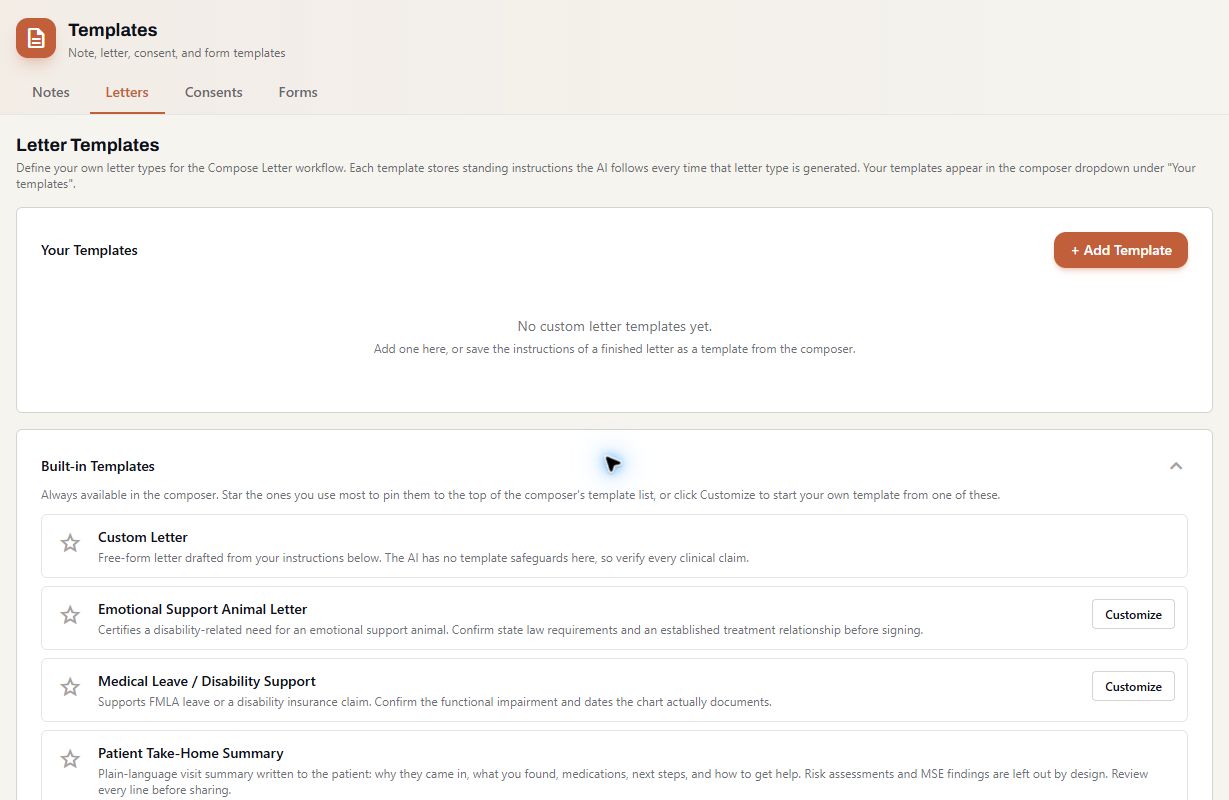
Actual test workspace showing the letter template library, Add Template, and built-in letter types

Actual test workspace, October 23. Release planned for October 26.

  • Encounter history, transcripts, MSE, and billing tools in the patient workspace
  • Reusable note and letter templates, with drafts you review
  • Copy the finished note into any EHR as structured text

Chrome extension

Psynopsis beside your browser-based EHR

Psynopsis Chrome extension panel with Transcript, MSE and Quality Metrics tabs and a Start New encounter button

Extension screenshot. The extension and web app have different layouts and controls.

  • Runs alongside browser-based EHRs such as Athena, DrChrono and CharmHealth
  • Transcript, MSE and quality checks in a side panel
  • Included on every plan, including Free

Try a visit

You ask the questions.
We'll play the patient.

Choose a fictional initial evaluation or follow-up. Read the clinician lines, hear the patient reply, and try capturing the visit in Psynopsis.

Try a visit No account needed to preview
  1. Choose your patient

    Maya, Jordan, or Riley. Two visits each.

  2. Speak your part

    The patient replies are recorded. Your lines stay live.

  3. See how the note reads

    Use the web app or Chrome extension to draft it.

Where it fits

Fits beside your existing EHR.

Psynopsis is a psychiatric scribe that works inside the system you already have.

FeaturePsynopsisGeneral scribes
Freed · Heidi
Behavioral-health platforms
JotPsych · PMHScribe
Built for prescribing psychiatric cliniciansBroad behavioral health
Automatic dose comparison against the previous planNot verifiedTranscription onlyVaries
MSE and safety documentationClinician-reviewed MSE and explicit safety selectionsTemplate-basedTemplate-based
Post-session dictation (no recording)Not stated
Works inside your current EHROr replaces it
42 CFR Part 2 handlingNot statedNot stated
Professional price per clinician$75 / moHeidi ~$99 / mo · Freed not stated$79–269 / mo

Based on public information, August 2026. Full comparisons: vs JotPsych · vs PMHScribe · vs Freed · vs Heidi

Five hours to see how it fits.

Test with synthetic or de-identified examples. BAA included only with paid plans.

Basic

Five hours to explore the workflow.

$0 for 5 hours of testing
  • AI-drafted psychiatric notes, reviewed and signed by you
  • Standard note templates
  • Chrome extension for your EHR or telehealth tab
  • Community support
  • Test with synthetic or de-identified examples
Start free
Most popular

Professional

For a full panel: the complete psychiatric note.

$75 per clinician / month
  • Everything in Basic
  • BAA included for clinical use
  • Advanced AI drafting for complex visits
  • Custom templates for your visit types
  • MSE integration with clinician review
  • Treatment-plan documentation templates
  • Priority support
  • Analytics dashboard
Choose Professional

Enterprise

For groups, clinics and SNF rounding teams.

Custom per practice
  • Everything in Professional
  • Multi-user access
  • Admin dashboard
  • Custom integrations
  • Dedicated support
  • Custom BAA
  • Onboarding assistance
Talk to us

The free allowance is for testing with synthetic or de-identified examples. BAA included only with paid plans. NPI verification required.

Questions prescribers ask first

Is audio recorded or stored?
No. Audio is processed in real time for transcription and immediately discarded. Nothing is stored on our servers, backed up or used to train models. If you use post-session dictation, the session itself is never recorded; only your short summary is processed, and that audio is discarded the same way.
Does Psynopsis work with my EHR?
Yes. Psynopsis runs beside any EHR as a web app or Chrome extension, so there is nothing to install on the EHR side. Finished notes copy into your system as structured text, and the Chrome extension keeps Psynopsis open alongside browser-based EHRs such as Athena, DrChrono and CharmHealth. Direct integrations are in development; contact us if you would like to be notified when your EHR is supported.
How is Psynopsis different from Freed or Heidi?
Freed and Heidi are general medical scribes designed to cover many specialties. Psynopsis is built exclusively for prescribing psychiatric clinicians by a practicing PMHNP: it provides medication reference cards and a clinician-reviewed mental status exam, structures SI/HI (passive vs active, plan, intent, means, protective factors), organizes the assessment and plan by diagnosis, handles 42 CFR Part 2 records and offers a post-session dictation mode that records nothing from the session.
Is there a BAA?
Yes. A Business Associate Agreement is included with every paid plan, and we will email a copy for review before you subscribe. Enterprise customers can use a custom BAA. 42 CFR Part 2 handling is built in for substance use disorder records.
What happens if the AI makes a clinical error?
Every note is a draft that requires your review. You must verify all medication names, dosages, clinical assessments and treatment plans before finalizing any note. Psynopsis is a documentation assistance tool; all clinical responsibility remains with the licensed provider. We recommend reviewing each section before signing, particularly medication entries and risk assessments.
How long does setup take?
Creating an account takes a couple of minutes: sign up, verify your NPI and pick your templates. NPI verification typically completes within 24 hours, and you can use your 5 free hours to test synthetic or de-identified examples after verification. Expect a brief adaptation period of one to two weeks before you see the full time savings. Enterprise customers receive dedicated onboarding assistance.
5 free hours · no credit card

Stop Spending Evenings on Notes

Psychiatric documentation that understands your workflow. MSE, medication changes, SI/HI — captured in a structured draft while you focus on your patients.

Test with synthetic or de-identified examples · BAA on paid plans